How to Build a Modern and Accessible Table of Contents (TOC)
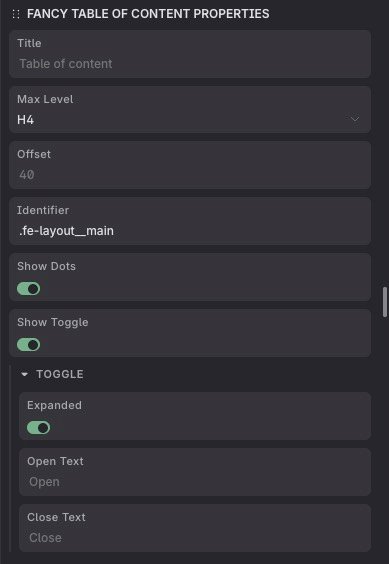
Introduction to Tables of Contents on the Web
A table of contents (TOC) is a fundamental component in long-form content such as blog posts, technical documentation, and knowledge bases. It allows users to quickly understand the structure of a page and navigate directly to the sections they care about.
In modern web environments—especially when working with visual builders like Etch or Bricks—creating a dynamic TOC requires careful handling of the DOM, asynchronous rendering, and accessibility considerations.
Why Use a TOC?
A TOC improves usability by providing a clear overview of the content. It also enhances SEO by reinforcing the semantic structure of headings, making it easier for search engines to understand the page.
Key Benefits
Some of the main benefits include faster navigation, better content comprehension, and increased user engagement.
User Experience
Users can jump directly to relevant sections without scrolling manually, which significantly improves interaction and reduces friction.
Accessibility
A well-implemented TOC helps screen readers interpret the document structure, improving accessibility for all users.
Semantic Structure of a TOC
A solid TOC starts with proper semantic HTML. Using elements like "nav", "ol", and correctly nested headings ensures both usability and maintainability.
Using the nav Element
The TOC container should be wrapped in a "nav" element to indicate that it represents internal navigation within the page.
Nested Lists
Ordered lists allow you to represent the hierarchy of headings clearly, making the structure easier to understand and extend.
Linking to Headings
Each TOC item should link to a real heading in the document, using unique ID attributes.
Best Practices
Avoid duplicate IDs and ensure that link text is descriptive and meaningful.
Automatic Generation with JavaScript
Automating the TOC ensures it stays in sync with the content without manual updates. This is especially useful in CMS-driven or builder-based workflows.
Detecting Headings
The script should scan the DOM and collect all headings from h2 to h6, depending on the configured starting level.
Assigning IDs
If a heading does not have an ID, one should be generated automatically to allow linking.
Building the Hierarchy
By using a stack-based approach, you can reconstruct the heading hierarchy and generate nested lists dynamically.
Common Pitfalls
A frequent issue is mishandling heading levels, which can break the TOC structure or create incorrect nesting.
Builder Compatibility
In tools like Etch Builder, content is often rendered dynamically, which means your TOC script must account for timing and DOM updates.
Asynchronous Rendering
The content may not be available immediately, requiring strategies such as delayed initialization or controlled observers.
Content Scope
Selecting the correct container for headings is crucial to avoid picking up editor placeholders or unrelated elements.
Performance Considerations
Avoid observing the entire DOM unnecessarily, as it can lead to performance issues in complex layouts.
Scroll Spy and Active Navigation
Scroll spy enhances the TOC by highlighting the currently visible section as the user scrolls through the page.
Using Intersection Observer
This modern API allows you to detect when elements enter the viewport without relying on expensive scroll event listeners.
Observer Configuration
Adjusting rootMargin values helps fine-tune when a section is considered active.
Active States
Applying classes like is-active provides clear visual feedback for the current section.
Accessibility Enhancements
You can also use attributes like aria-current="true" to improve support for assistive technologies.
This Section Should Be Ignored
This heading is intentionally marked to be excluded from the TOC if you implement custom filtering logic.
Conclusion
Building a dynamic and accessible TOC not only improves user experience but also strengthens the structural quality of your content. In modern environments, handling dynamic rendering and performance is essential.
With the right architecture, a TOC can become a reusable and powerful component within your design system or plugin ecosystem.